Holiday
The Holiday feature in PrismERP enables efficient management of company holidays across branches,departments, and employee groups. It supports defining holiday policies, categorizing holiday types, generating holidays automatically, and managing special or batch holidays with ease. Users can quickly search, filter, and edit holiday records to ensure accurate scheduling and consistent application of policies. With tools for recurring, individual, and group holiday management, PrismERP simplifies holiday administration while keeping workforce planning organized and precise.
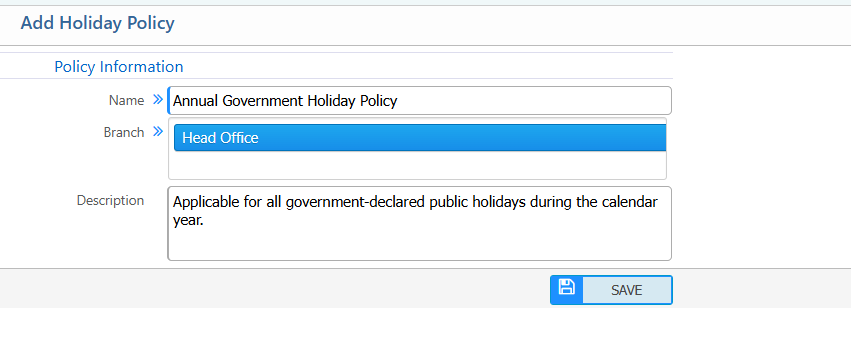
Add Holiday Policy
Use this form to create a holiday policy and assign it to one or more branches.
| Field | Action |
|---|---|
| Name | Enter a name for the holiday policy to identify it within the system. |
| Branch | Select one or more branches to which this holiday policy will be applied. |
| Description | Enter a brief description to explain the purpose and scope of the holiday policy. |
Holiday Policy List – Search & Actions
| Field | Action |
|---|---|
| Name | Search by holiday policy name to quickly locate a specific policy from the list. |
| Branch | Filter holiday policies by branch to view policies applicable to a specific branch. |
| Add | Add a new holiday policy to define branch-wise holiday settings. |
| Edit | Edit the selected holiday policy to update its name, branch assignment, or description. |
| Delete | Delete the selected holiday policy from the system if it is no longer required. |

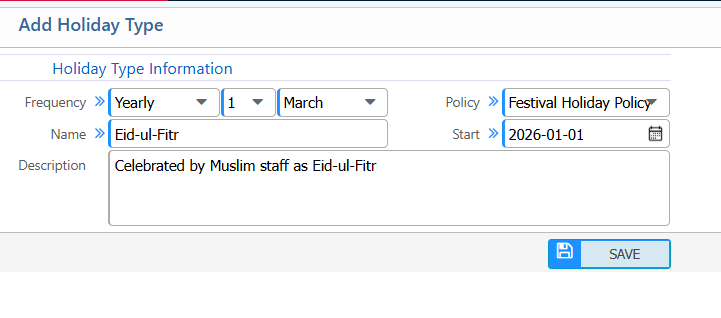
Add Holiday Type
Holiday types are created under a holiday policy and can be recurring (Yearly/Monthly) or one-time.
| Field | Action |
|---|---|
| Name | Enter a name for the holiday type to identify it within the system. |
| Policy | Select the holiday policy under which this holiday type will fall. Use this to associate branch-wise or system-wide rules. |
| Frequency | Select how often this holiday occurs (e.g., One-time, Annual, Monthly). |
| Start Date | Enter the start date of the holiday to define when the holiday begins. |
| End Date | Enter the end date of the holiday if the holiday spans multiple days. |
| Description | Enter a brief description explaining the purpose or details of this holiday type. |
Holiday Type List – Search & Actions
| Field | Action |
|---|---|
| Name | Search by holiday type name to quickly locate a specific holiday type from the list. |
| Frequency | Filter holiday types by frequency (e.g., Yearly, Monthly, One-time) to view recurring or one-time holidays. |
| Recurrence | Filter by recurrence rules to check holidays occurring on specific dates or patterns. |
| Policy | Filter holiday types by assigned holiday policy to view holidays under a specific policy. |
| Start Date | Filter holiday types by start date to view holidays within a specific time range. |
| Add | Add a new holiday type to define holidays under a selected policy. |
| Edit | Edit the selected holiday type to update its name, frequency, recurrence, policy, start date, or description. |
| Delete | Delete the selected holiday type if it is no longer required. |

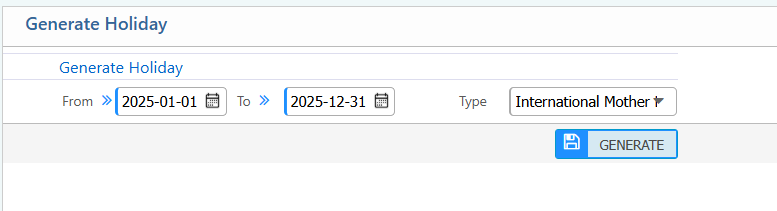
Generate Holiday
This option generates holidays automatically based on defined holiday types.
| Field | Action |
|---|---|
| From | Select the start date to define the beginning of the holiday generation period. |
| To | Select the end date to define the end of the holiday generation period. |
| Type | Select the holiday type(s) to generate holidays for, based on existing holiday types defined in the system. |
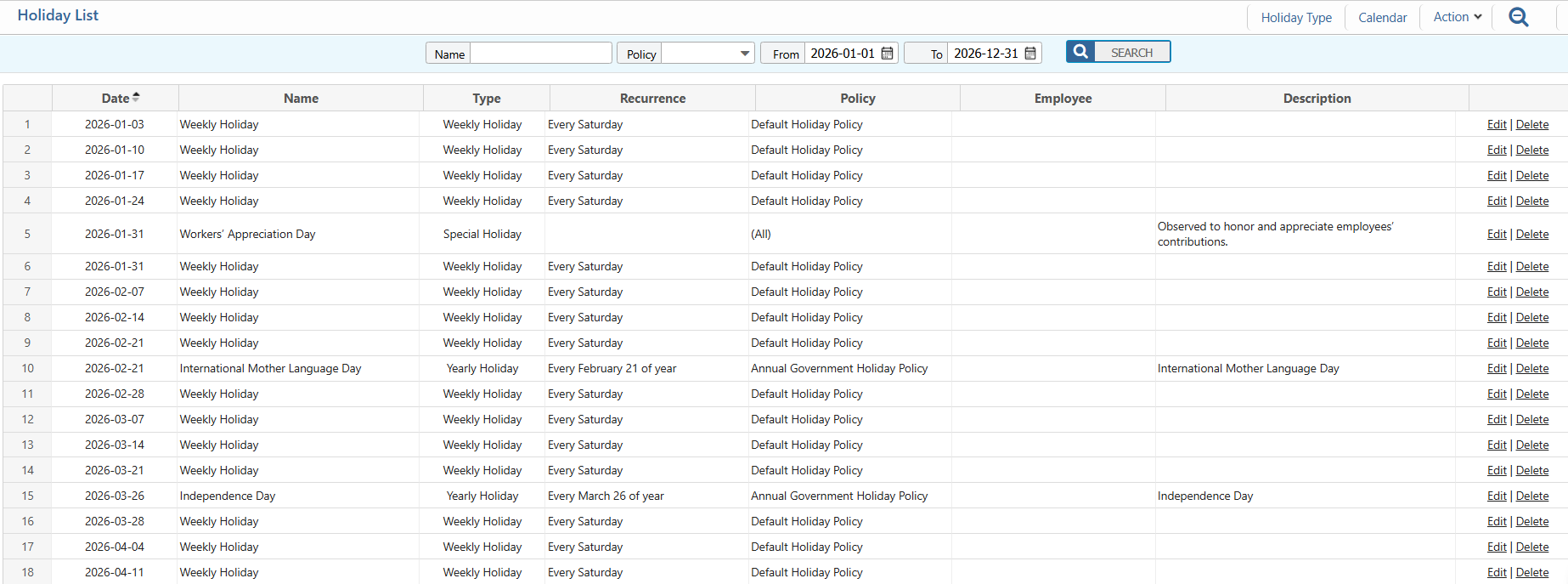
Holiday List – Search & Actions
| Field | Action |
|---|---|
| Name | Search by holiday name to quickly locate a specific holiday in the list. |
| Policy | Filter holidays by assigned holiday policy to view only holidays under a specific policy. |
| From | Filter holidays starting from a specific date to view holidays within a selected range. |
| To | Filter holidays ending by a specific date to view holidays within a selected range. |
| Edit | Edit the selected holiday to update its date, type, recurrence, policy, or description. |
| Delete | Delete the selected holiday if it is no longer required. |
Add Special Holiday
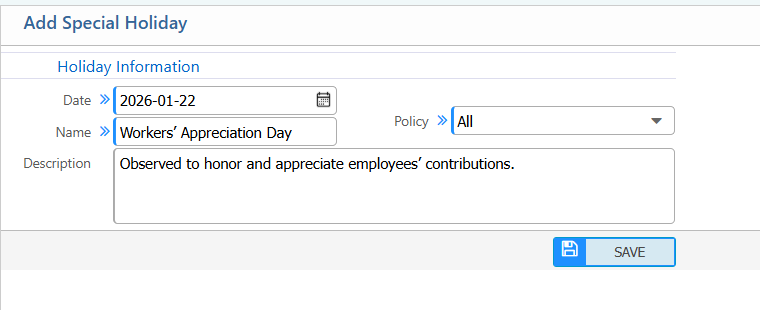
| Field | Action |
|---|---|
| Date | Select the date for the special holiday. |
| Name | Enter a name for the special holiday to identify it in the system. |
| Policy | Select the holiday policy under which this special holiday will fall. |
| Description | Enter a brief description explaining the purpose or details of the special holiday. |
Holiday Calendar
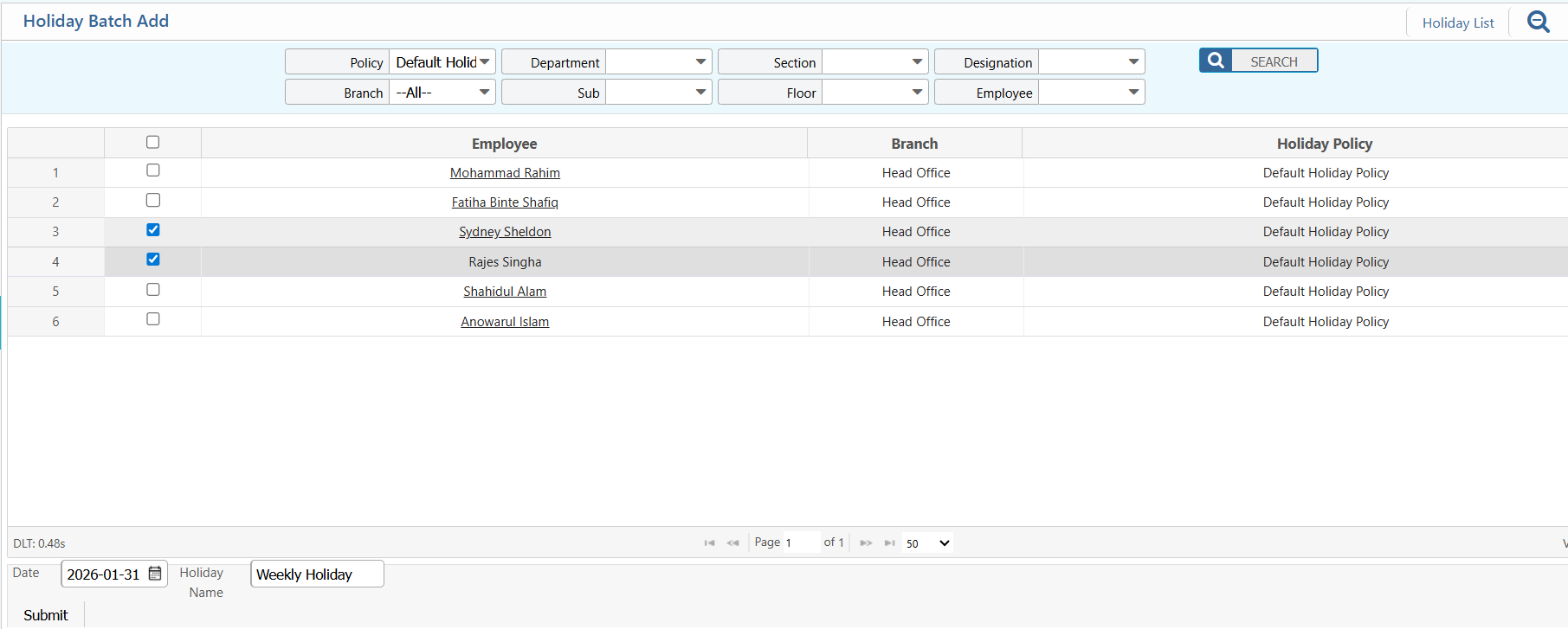
Add Batch Holiday
| Field | Action |
|---|---|
| Policy | Filter employees by the holiday policy to apply for the batch (e.g., Default Holiday Policy, Festival Holiday Policy). |
| Branch | Filter employees by branch to include only those in selected branches. |
| Department | Filter employees by department to narrow down the selection. |
| Sub Department | Filter employees by sub-department to further refine the list. |
| Section | Filter employees by section to assign holidays to specific sections. |
| Floor | Filter employees by floor if applicable for location-based assignment. |
| Designation | Filter employees by designation to include only specific roles. |
| Select Employee | Tick/select employees from the list to include them in the holiday batch. |
| Date | Enter the holiday date (YYYY-MM-DD) for this batch. |
| Holiday Name | Enter the name of the holiday to be applied for the selected employees. |
| Submit | Click Submit to add the selected employees to the holiday batch. |