Service
Service setup in PrismERP is used to structure and manage service-related data from basic service definition to pricing, packaging, and accounting configuration. It starts with defining Service Items, where services are categorized and tax structures are assigned. Based on these items, individual Services are created with pricing, measurement units, vendors, taxes, and accounting mappings to control how each service is billed and recorded.
These services can then be grouped into Service Packages, where multiple services are bundled together with defined billing cycles, pricing types, quantities, and discounts for structured billing and reuse. This setup forms the foundation for service-based operations, enabling consistent service definition, pricing control, and organized service delivery throughout the system.
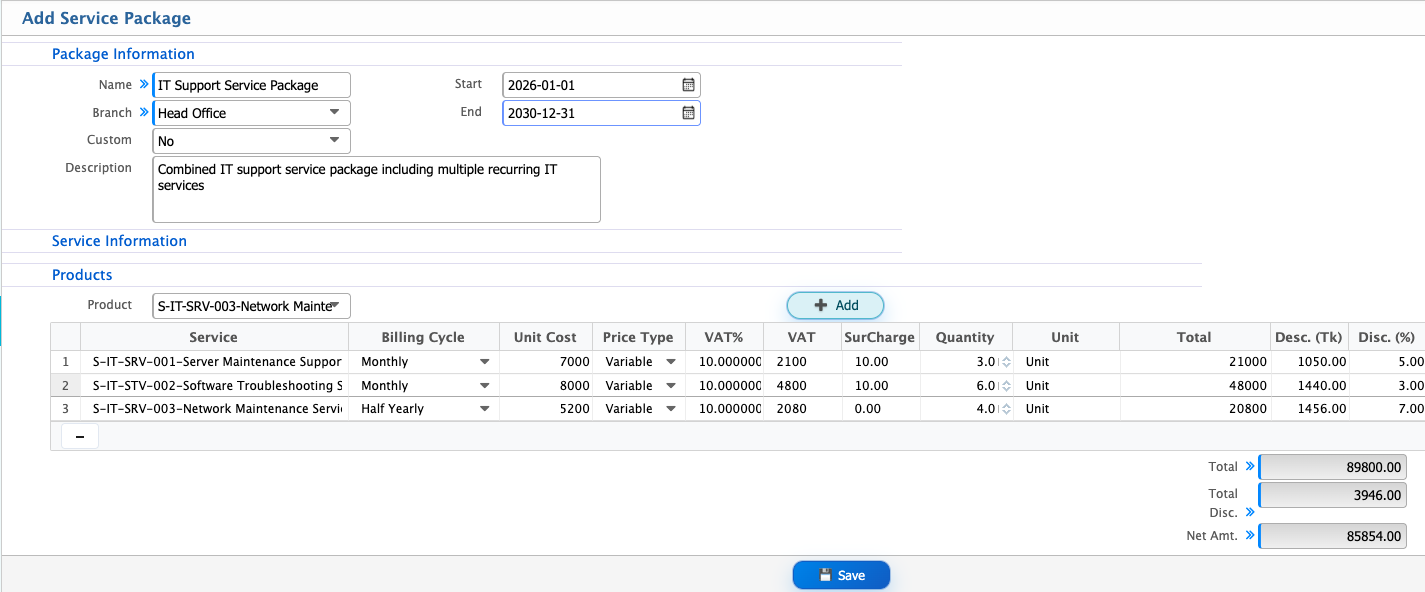
Add Service Item
| Field | Action |
|---|---|
| Name | Enter a clear and unique name for the service item that will be used to identify it in the system |
| Type | Select the category or nature of the service item to define how it will be processed |
| Recurrent Service | Select this option if the service is provided on a recurring basis |
| Tax Section | Select the relevant tax section that applies to this service item for tax calculation purposes |
| Tax Subsection | Select the specific tax subsection under the chosen tax section to ensure accurate tax handling |
| Description | Enter detailed information about the service item, including its purpose and usage context |
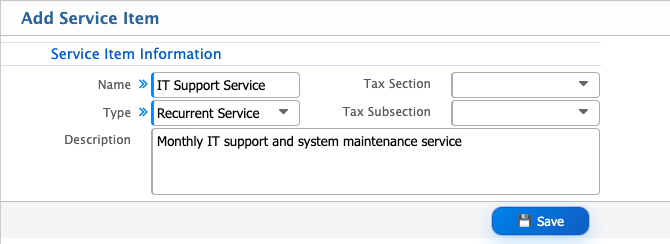
Add Service
| Field | Action |
|---|---|
| Item Type | Select the type of service (e.g., Recurrent Service or On Demand Service) |
| Item | Select the Service Item under which this service will be added |
| Name | Enter the name of the service |
| Service Code | Enter a unique code to identify the service |
| Unit Of Measurement | Select the unit used to measure the service |
| Step Size | Enter the minimum quantity increment for the service |
| Surcharge (%) | Enter any additional charge percentage applicable to the service |
| Preferred Vendor | Select the vendor associated with providing this service |
| Purchase VAT (%) | Enter the VAT percentage applicable on service purchase |
| Tax Section | Select the applicable tax section for the service |
| Tax Sub Section | Select the relevant tax subsection |
| VAT | Enter or confirm VAT applicability for the service |
| SD | Enter supplementary duty if applicable |
| Sale Discount | Enter the discount percentage applicable on sale |
| Purchase Discount | Enter the discount percentage applicable on purchase |
| Purchase Price | Enter the cost price of the service |
| Sale Price | Enter the selling price of the service |
| Availability in SO | Select to make the service available in Sales Order |
| Availability in PO | Select to make the service available in Purchase Order |
| Description | Enter details or notes about the service |
| Income Account | Select the account used to record service sales income |
| Expense Account | Select the account used to record service-related expenses |
| VDS Account | Select the account used for VAT Deducted at Source if applicable |
| TDS Account | Select the account used for Tax Deducted at Source |
| Receive Account | Select the account used to receive payments for the service |
| Unearned Account | Select the account used for advance income not yet earned |
| Prepaid Expense Account | Select the account used for prepaid service expenses |
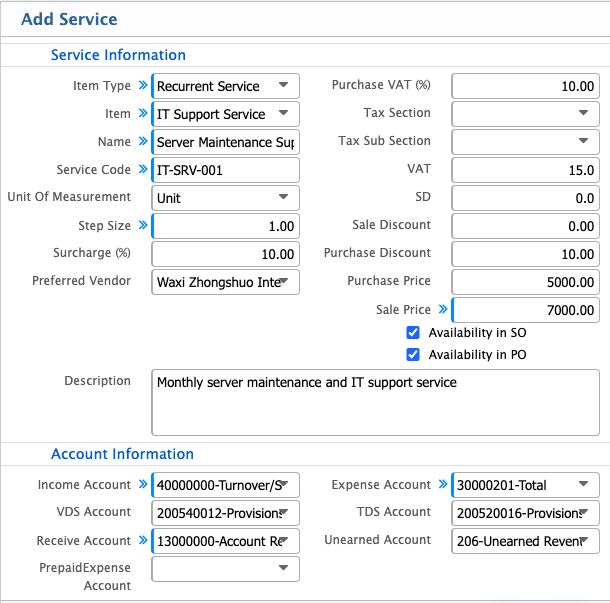
Add Service Package
| Field | Action |
|---|---|
| Name | Enter a name to identify the service package for billing and reference |
| Branch | Select the branch where the service package will be used |
| Custom | Select whether the package is custom-defined (Yes/No) |
| Start | Select the date from which the package will be active |
| End | Select the date until which the package will remain active |
| Description | Enter a short description of the service package |
| Product / Service | Select the service to include in the package |
| Billing Cycle | Select how often the service will be billed (e.g., Monthly) |
| Price Type | Select whether the price is Static or Variable |
| VAT (%) | Enter VAT percentage applicable to the service |
| Surcharge (%) | Enter additional charge percentage if applicable |
| Quantity | Enter service quantity for the package |
| Disc. (%) | Enter discount percentage if applicable |