Territory Organogram
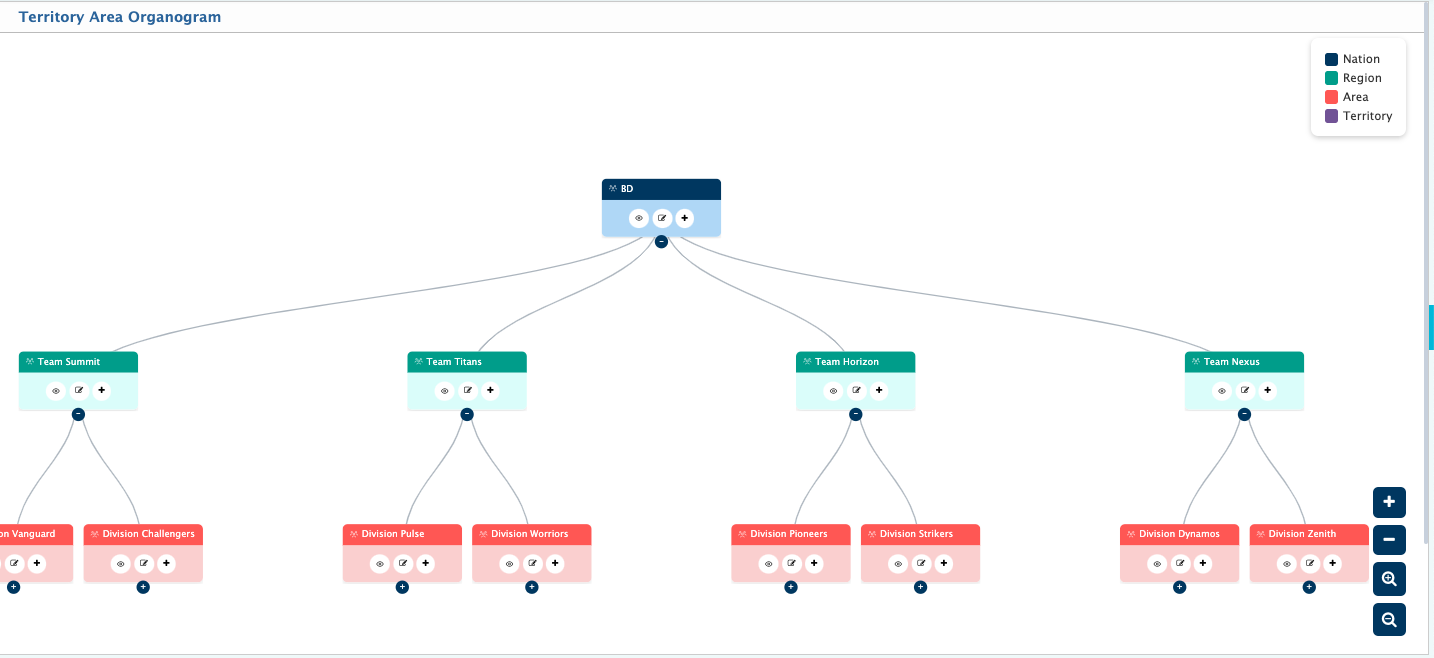
The Territory Area Organogram in PrismERP provides a hierarchical tree view of all configured territory structures, starting from the highest level and extending down to the operational territory level. It visually represents how each territory area is connected within the organization, typically arranged in layers such as Nation, Region, Area, and Territory.In PrismERP, the organogram begins with the top-level node representing the Nation level. Under this, different territory groups are displayed based on the configured hierarchy. Each node can be expanded using the "+" icon to view its child levels and collapsed to simplify the view when needed.
Each node in the PrismERP Territory Organogram represents a configured territory area and maintains its parent-child relationship within the hierarchy. Along with the structure, users can also view the assigned person or responsible designation for each territory level, such as GM, AGM, DGM, SM, or SR, depending on the setup.From the organogram, users can also access individual territory areas to edit or update territory information, including name, hierarchy placement, parent assignment, and related configuration details. This allows direct management of territory structures from the visual hierarchy without navigating to separate setup screens.Overall, the Territory Area Organogram in PrismERP is used to view, analyze, and manage the complete territory distribution in a structured and interactive format, showing both the hierarchical flow and the assigned responsibilities across the system.