Module Activation & Configuration
Hire Sales Activation
Before using Hire Sales in PrismERP, the Hire Sales module needs to be activated from the module configuration. After activating the module, the EMI Configuration option becomes available under the configuration settings.
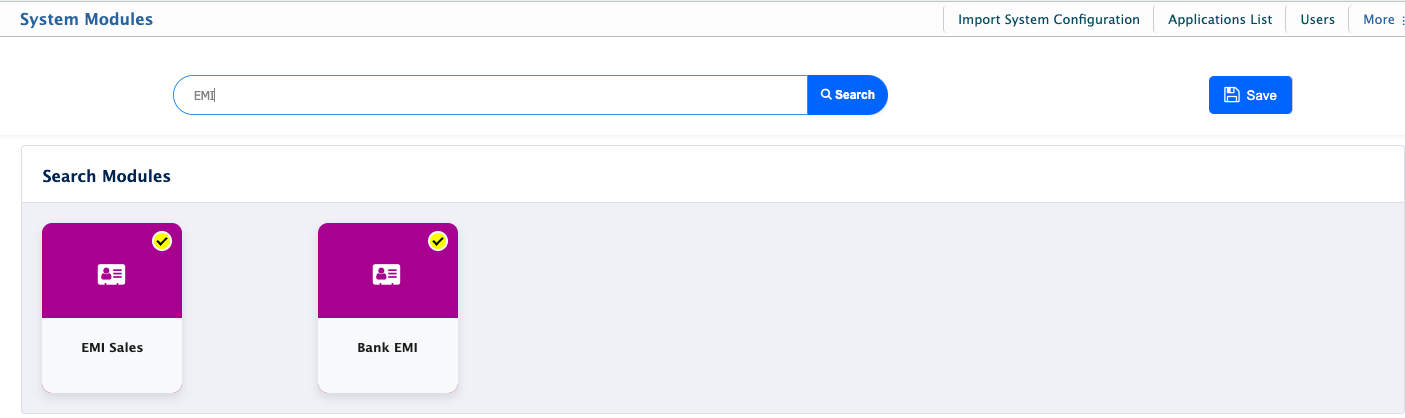
Users can then navigate to the configuration page and select Sale Invoice to configure the settings required for hire sales and installment-based transactions.
EMI Configuration
The EMI Configuration section in PrismERP is used to set the rules for hire sales and installment payments. Users can set the maximum due amount after the down payment, interest-free tenure, interest rates, late payment fees, and the accounts used for different discounts and fees. It also includes settings for restricting sale invoice changes after completion and managing interest waivers for early payments and settlement discounts.
EMI Configuration Fields
| Field | Action |
|---|---|
| MRRP Increase Rate | Enter the rate by which the MRRP will be increased for hire sales. |
| Maximum Due after Down Payment | Enter the maximum amount that can remain due after the customer makes the down payment. |
| Interest Free Tenure Months | Enter the number of months for which the hire sale remains interest-free. |
| Lock Sale Invoice Modification after Completion | Enable or disable the restriction on modifying a sale invoice after the hire sale is completed. |
| Waive Interest for | Select the payment condition for which interest will be waived, such as early payment. |
| Late Payment Fee per Month | Enter the amount charged as a late payment fee for each month of delayed payment. |
| Interest Waiver Discount | Select the account to be used for recording discounts provided when interest is waived. |
| Late Payment Fee Income | Select the account used to record income generated from late payment fees. |
| Hire Early Settlement Discount | Select the account used to record discounts provided when a hire sale is settled before the scheduled tenure. |
| Tenure | Enter the number of months for the hire sale tenure. |
| Interest Rate | Enter the interest rate applicable to the selected tenure. |
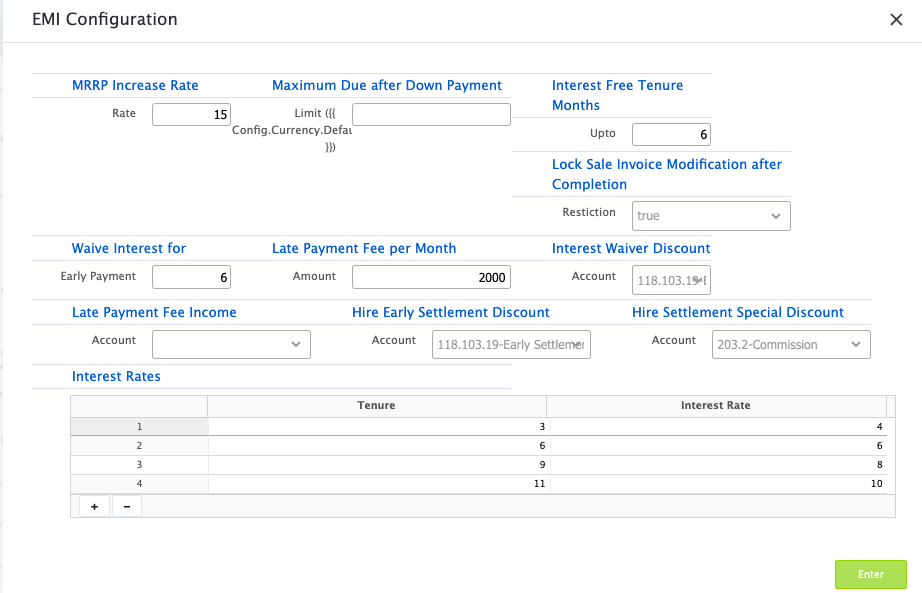
After configuring the EMI settings and interest rates, the values are used when creating and processing hire sales through the Sale Invoice section. The configured tenure, interest rate, payment conditions, fees, and discount accounts determine how installment-based transactions are processed and recorded in the system.
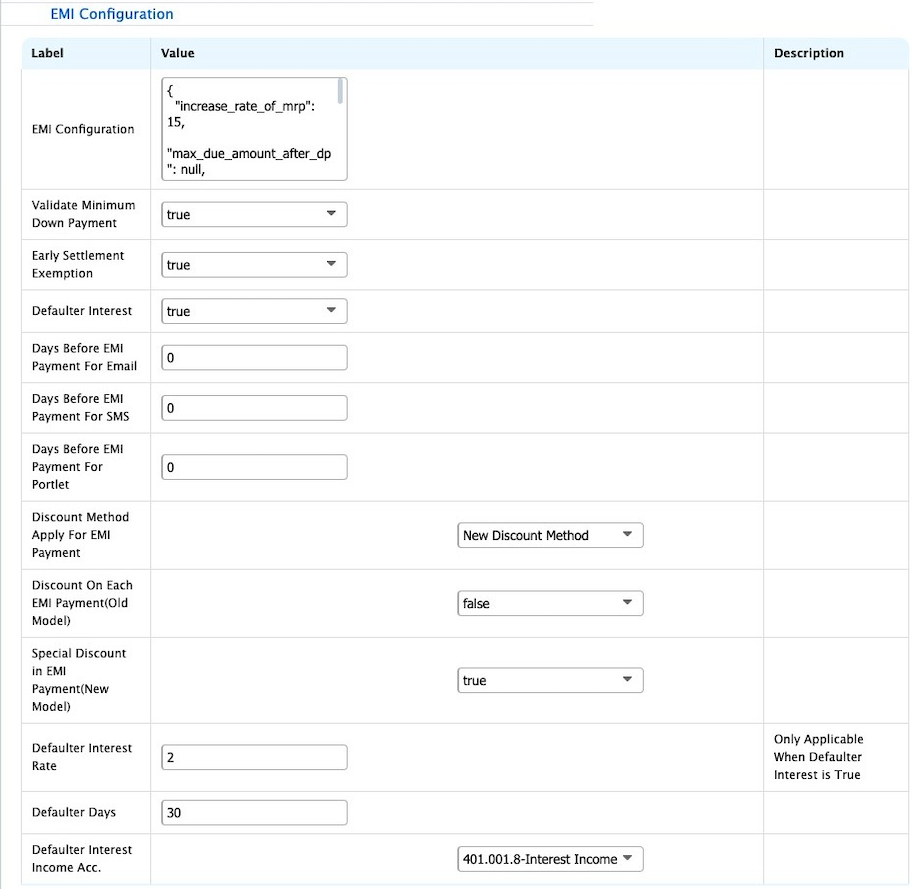
| Field | Action |
|---|---|
| Validate Minimum Down Payment | Enable or disable validation of the minimum down payment required for a hire sale. |
| Early Settlement Exemption | Enable or disable the exemption applied when a hire sale is settled before the scheduled tenure. |
| Defaulter Interest | Enable or disable interest calculation for customers who become defaulters. |
| Days Before EMI Payment For Email | Enter the number of days before the EMI due date to send an email notification. |
| Days Before EMI Payment For SMS | Enter the number of days before the EMI due date to send an SMS notification. |
| Days Before EMI Payment For Portlet | Enter the number of days before the EMI due date to display a notification in the portlet. |
| Discount Method Apply For EMI Payment | Select the discount method to apply to EMI payments: Old Discount Method or New Discount Method. |
| Discount On Each EMI Payment (Old Model) | Enable or disable the discount applied to each EMI payment under the old discount method. |
| Special Discount in EMI Payment (New Model) | Enable or disable the special discount applied to EMI payments under the new discount method. |
| Defaulter Interest Rate | Enter the interest rate to be applied to defaulter accounts. This option applies when Defaulter Interest is enabled. |
| Defaulter Days | Enter the number of days after the due date from which the customer is considered a defaulter. |
| Defaulter Interest Income Acc. | Select the account used to record income from defaulter interest. |