Payroll Items
The Payroll Items feature in PrismERP is used to configure different salary components that are later used in payroll processing. It allows users to define and manage various earning, addition, and deduction elements in a structured format.
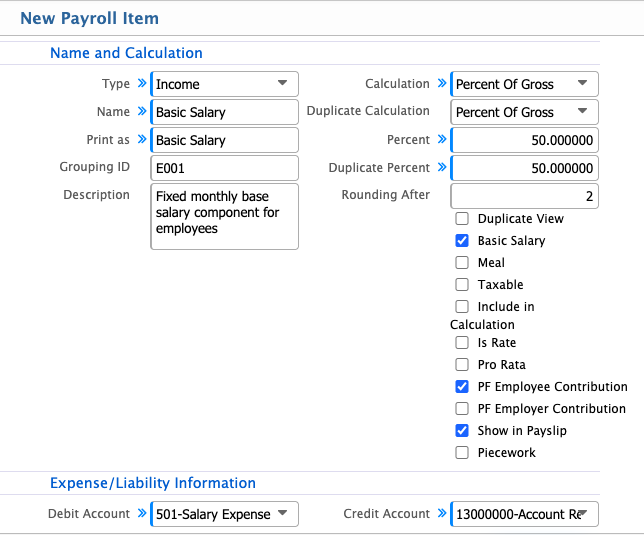
Through the Add Payroll Item form, users can set up each payroll component by providing details such as its type, calculation method, applicable rules, and accounting information. This helps in defining how each item will behave within the payroll setup.
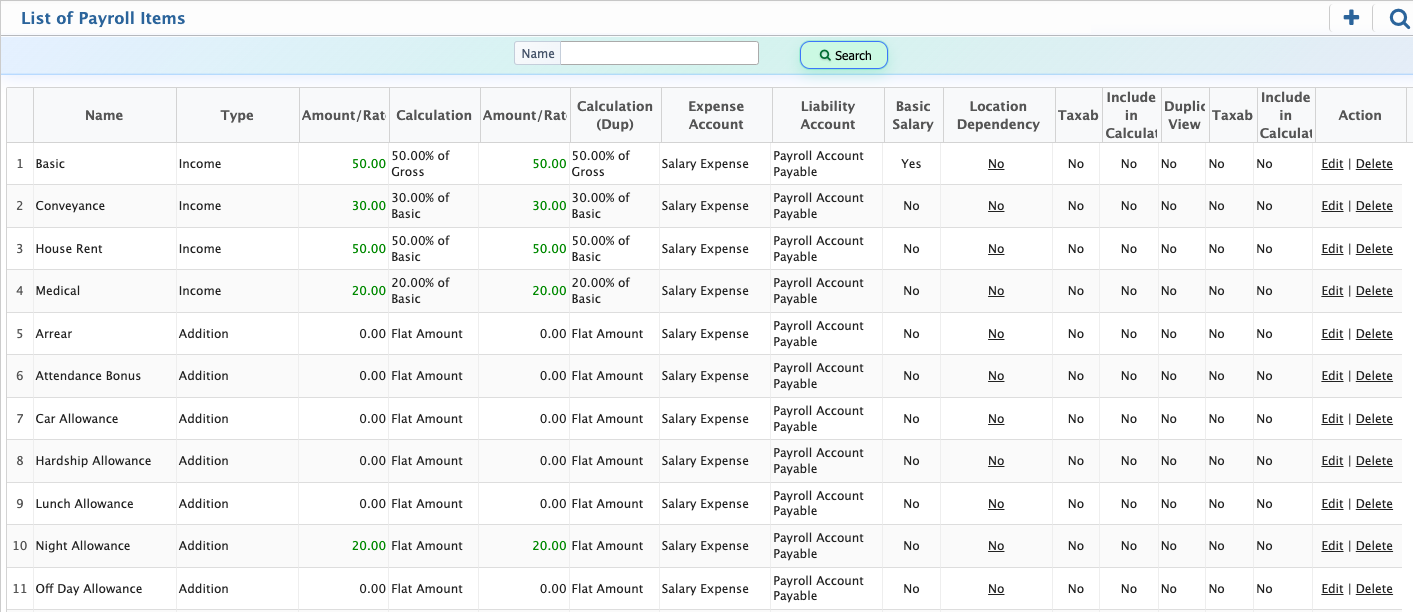
Once created, each payroll item is shown in the Payroll Item List, where all records are available in one place. Users can use search by name to quickly find specific items and can also edit or delete entries when required.
Add Payroll Item
| Field | Action |
|---|---|
| Type | Select the type of the payroll items (income,addition,deduction). |
| Name | Enter a clear and identifiable name for the payroll item used in salary processing. |
| Grouping ID | Select a grouping category to organize this item in reports and payroll structure. |
| Description | Enter a detailed explanation to clarify the purpose of this payroll item. |
| Calculation | Select the calculation method such as Flat Amount or other available options. |
| Flat Amount | Select this option if the payroll item is a fixed value. |
| Duplicate Calculation | Select an additional calculation method if the item needs to be calculated more than once. |
| Amount | Enter the fixed value for this payroll item. |
| Duplicate Amount | Enter the secondary amount if duplicate calculation is applied. |
| Rounding After | Enter the number of decimal places to round the calculated value. |
| Basic Salary | Select if this item is part of the employee’s basic salary. |
| Meal | Select if this item represents a meal allowance or benefit. |
| Taxable | Select if this payroll item should be included in tax calculations. |
| Include in Calculation | Select to include this item in overall payroll computation. |
| Is Rate | Select if the value is calculated based on a rate instead of a fixed amount. |
| Pro Rata | Select to calculate the amount proportionally based on attendance or time worked. |
| PF Employee Contribution | Select if this item contributes to the employee provident fund. |
| PF Employer Contribution | Select if this item contributes to the employer provident fund. |
| Show in Payslip | Select to display this payroll item in the employee payslip. |
| Piecework | Select if the payroll item is based on quantity or output produced. |
| Debit Account | Select the account that will be debited when this payroll item is processed. |
| Credit Account | Select the account that will be credited when this payroll item is processed. |
After a payroll item is created in PrismERP, it will appear in the Payroll Item List. From this list, users can view the basic information of all payroll items in one place. The list also includes a search by name option, allowing users to quickly find a specific payroll item when needed. Each record is available for further action, where users can edit the details of an existing payroll item or delete it if it is no longer required.