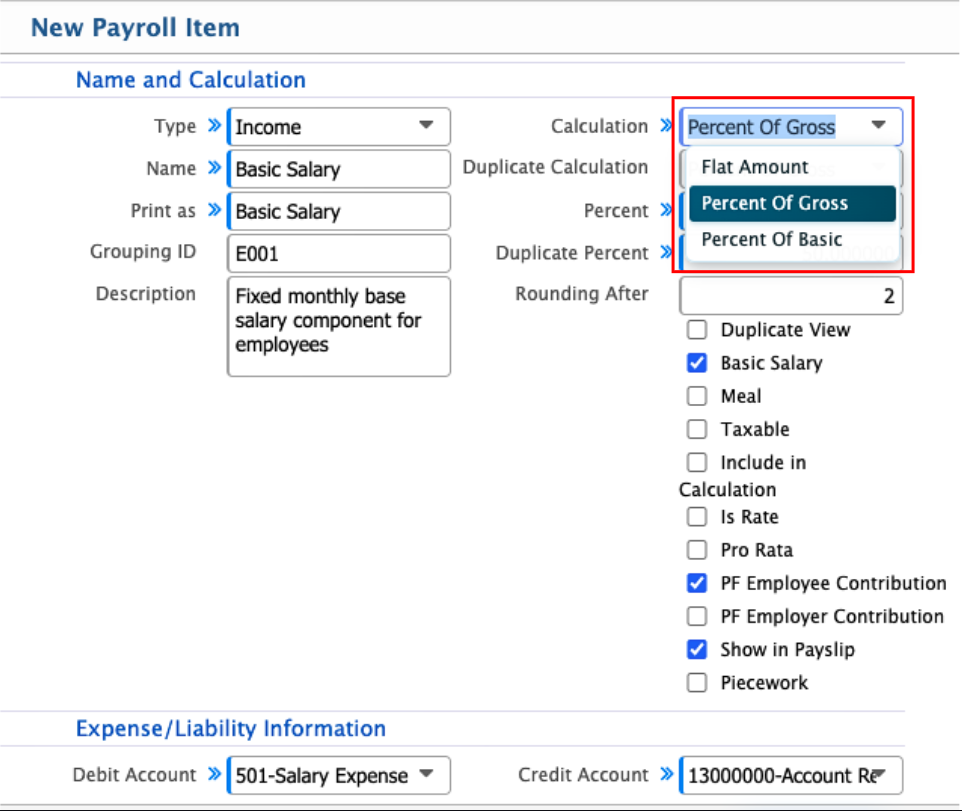
Payroll Item Calculation
In PrismERP, the calculation method defines how each payroll item is computed, and users can choose from three options:
- Flat Amount
- Percent of Gross
- Percent of Basic
Flat Amount is used when a fixed value is assigned to a payroll item, meaning the amount remains the same in every payroll cycle. Percent of Gross calculates the value based on the employee’s total gross salary, so it changes whenever the gross salary changes. Percent of Basic calculates the value only from the basic salary, making it directly dependent on the core salary structure and more consistent.
The system also provides Duplicate Calculation and Duplicate Percentage to handle more flexible payroll scenarios. Duplicate Calculation is used when the same payroll item needs to be applied more than once within a single payroll cycle, but under different rules or conditions. Instead of treating it as a single calculation, the system calculates it separately again when needed. Duplicate Percentage defines the percentage that will be applied for this second calculation. In simple terms, it allows the same payroll item to be calculated in two different ways within the same payroll run, and the system manages both values based on the configured payroll rules.