Employee Promotion
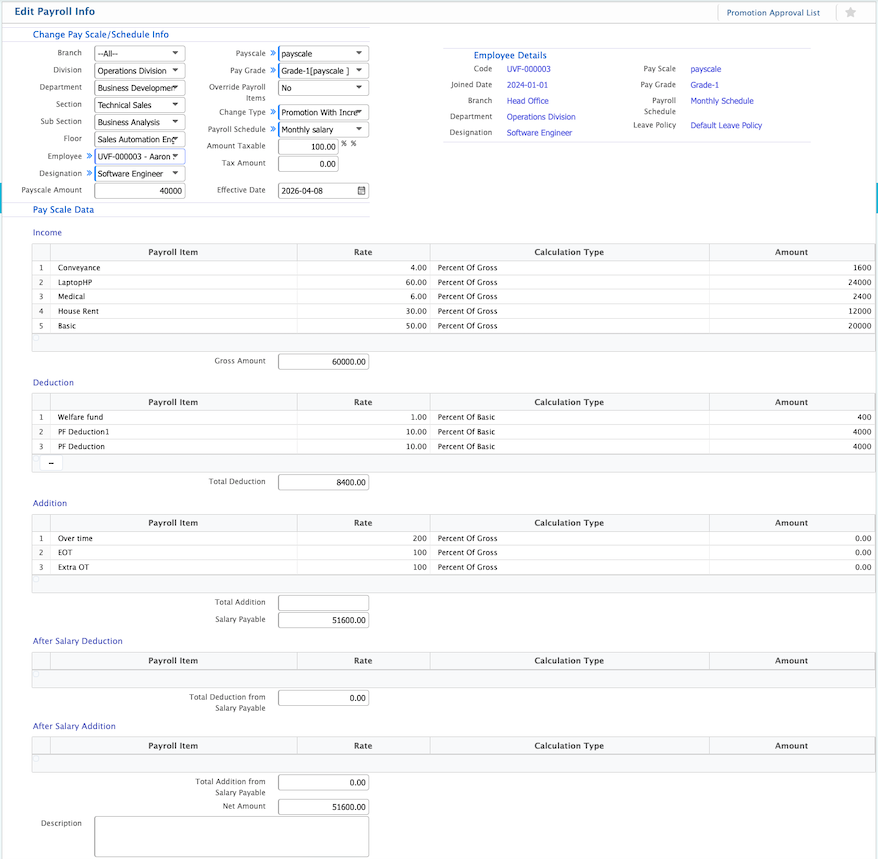
PrismERP provides a user-friendly Employee Promotion feature to manage promotions and payroll adjustments seamlessly. Users can select employees and update their pay scale, pay grade, payroll schedule, taxable amounts, and salary. The system also allows specifying the type of change, overriding payroll items if needed, and setting the effective date for the promotion.
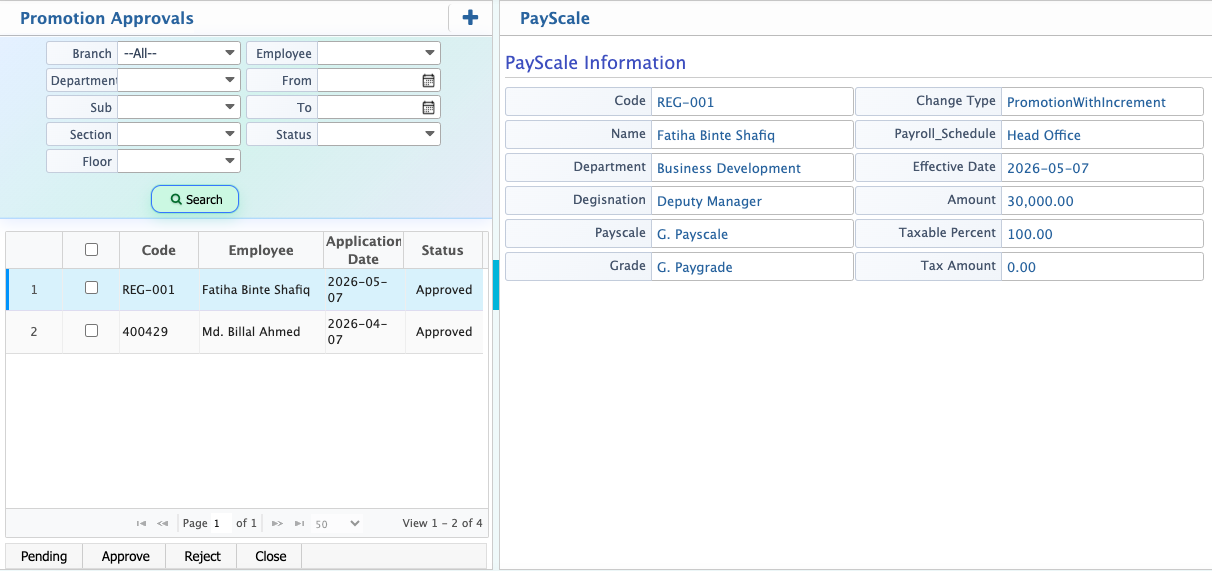
Once a promotion is added, it appears on the Promotion Approval List with all employee and payroll details. In the Pending stage, the record is fully editable, so users can make updates before finalizing. The search and filter panel makes it easy to quickly find specific employees or promotion records.
| Field | Action |
|---|---|
| Branch | Select the branch to filter employees whose payroll info needs review or editing. |
| Division | Select the division to narrow down the employee list for payroll updates. |
| Department | Select the department to identify employees under a specific department. |
| Section | Select the section to filter employees within the department. |
| Sub Section | Select the sub section to further refine employee selection. |
| Floor | Select the floor to filter employees based on physical or operational location. |
| Employee | Search and select the employee by name or code to view or edit payroll information. |
| Pay Scale | Display or select the current pay scale assigned to the employee. |
| Pay Grade | Display or select the pay grade corresponding to the pay scale. |
| Override Payroll Items | Choose Yes or No to allow overriding specific payroll items for the employee. |
| Change Type | Select the type of payroll change, e.g., promotion or adjustment. |
| Payroll Schedule | Select or update the payroll schedule that will apply after the change. |
| Amount Taxable | Enter the taxable amount to be applied under the payroll change. |
| % Tax Amount | Enter the percentage of tax to be applied to the taxable amount. |
| Payroll Schedule (Current) | Display the payroll schedule currently applied to the employee. |
| Pay Scale Amount | Enter or update the salary amount corresponding to the selected pay scale. |
| Effective Date | Select the date from which the payroll changes will take effect. |
After adding a promotion or payroll change, the record appears on the Promotion Approval List with all relevant employee and payroll details. Users can review and verify the updated pay scale, payroll schedule, amounts, and other payroll information.
In the Pending stage, the promotion record is editable, allowing users to make necessary updates before it is finalized. The search and filter panel helps quickly locate specific employees or promotion records for review and editing.