Employee Qualifications
In PrismERP, users can manage employee qualifications directly from the Employee Profile. This includes adding Education Information, such as degree level, major, board, institute, passing year, result, and attachments. Users can also record Training Information, including training name, certified by, location, arranged by, duration, start and end dates, and result.
Experience Information can be added with organization name, position, start and end dates, service period, experience type, responsibilities, and attachments. Professional achievements can be captured under Professional Certificate Information, with certificate name, certificate ID, certified by, award date, and validity.
Each qualification entry can be filled in or edited as needed. Users can attach supporting documents where applicable. All entries are organized within the employee profile for clarity. The module allows seamless addition of multiple records in each category. Users can maintain a complete record of an employee’s qualifications over time.
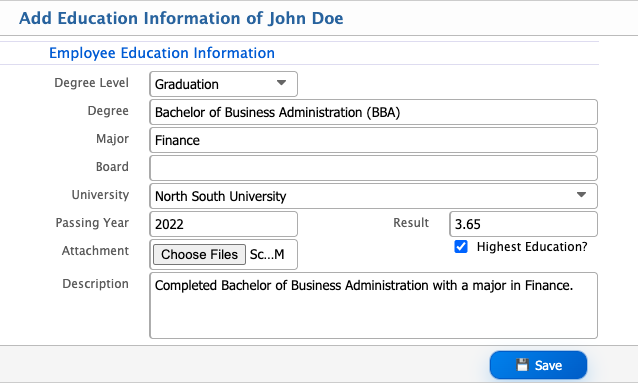
Add Education Information
| Field | Action |
|---|---|
| Degree Level | Select the level of education, such as Under PSC, SSC, HSC, Graduate, Postgraduate, etc. |
| Degree | Enter the specific degree or certification obtained by the employee. |
| Major | Enter the major or specialization of the degree if applicable. |
| Board | Enter the educational board or university awarding the degree. |
| Institute Name | Enter the name of the school, college, or university where the employee studied. |
| Passing Year | Enter the year in which the employee completed the degree. |
| Result | Enter the result, grade, or GPA achieved for the degree. |
| Attachment | Upload supporting documents such as mark sheets, certificates, or transcripts. |
| Highest Education? | Select “Yes” if this is the highest education qualification of the employee. |
| Description | Enter any additional notes or remarks regarding the employee’s education. |
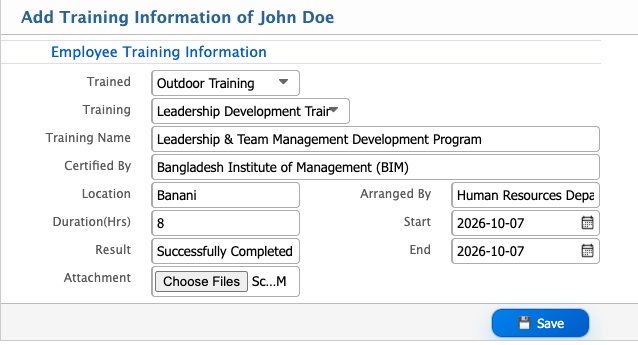
Add Training Information
| Field | Action |
|---|---|
| Trained | Select whether the training was In House or External or any other location if applicable. |
| Training | Select the type or category of training, if applicable. |
| Training Name | Enter the full name of the training program. |
| Certified By | Enter the authority, organization, or instructor who provided the certification. |
| Location | Enter the location where the training was conducted. |
| Arranged By | Enter the department or organization that arranged the training. |
| Duration (Hrs) | Enter the total duration of the training in hours. |
| Start | Select the starting date of the training session. |
| End | Select the ending date of the training session. |
| Result | Enter the outcome of the training, such as Passed, Completed, or Grade/Score achieved. |
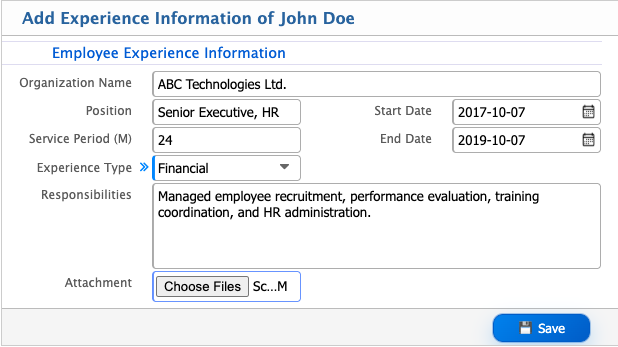
Add Experience Information
| Field | Action |
|---|---|
| Organization Name | Enter the name of the organization where the employee previously worked. |
| Position | Enter the job title or position held by the employee in that organization. |
| Start Date | Select the date when the employee started working at the organization. |
| End Date | Select the date when the employee left the organization. |
| Service Period (M) | Enter the total service period in months. This can also be auto-calculated based on the start and end dates. |
| Experience Type | Select the type of experience, such as Financial, Technical, Administrative, etc. |
| Responsibilities | Enter a brief description of the key responsibilities or tasks performed in that position. |
| Attachment | Upload supporting documents such as experience letters, appointment letters, or relieving letters. |
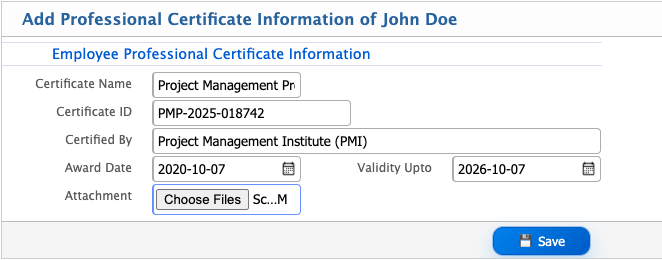
Add Professional Certificate
| Field | Action |
|---|---|
| Certificate Name | Enter the full name of the professional certificate or credential. |
| Certificate ID | Enter the unique certificate identification number if applicable. |
| Certified By | Enter the authority, organization, or institution that issued the certificate. |
| Award Date | Select the date when the certificate was awarded. |
| Validity Upto | Enter the expiry date or validity period of the certificate if applicable. |