Late Deduction Policy
In PrismERP, the Late Deduction Policy is used to define how repeated late attendance is handled within the organization. It allows users to configure different deduction actions based on both consecutive and non-consecutive late occurrences, including how each stage impacts employee leave or other defined actions.
This setup helps structure how late behavior is evaluated over time, with separate rules for multiple occurrences and a final action when limits are exceeded. It is applied under a selected leave policy and directly influences how employee attendance impacts their leave balance.
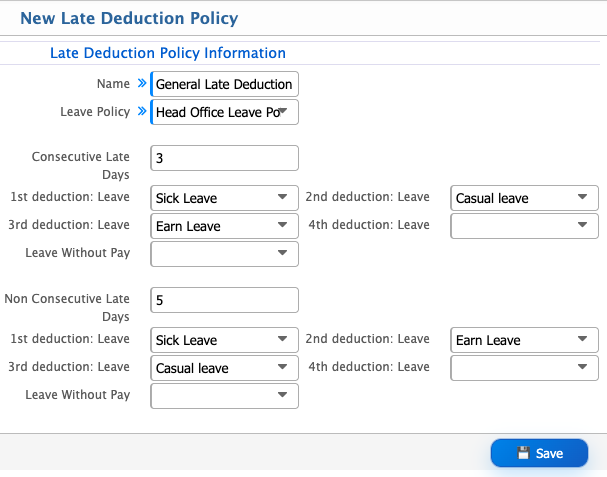
Add Late Deduction Policy
| Field | Action |
|---|---|
| Name | Enter a clear and unique name for the late deduction policy to identify it within the system. |
| Leave Policy | Select the leave policy under which this late deduction rule will be applied. |
| Consecutive Late Days (1st Deduction) | Define the deduction type applied after the first consecutive late occurrence. |
| Consecutive Late Days (2nd Deduction) | Define the deduction type applied after the second consecutive late occurrence. |
| Consecutive Late Days (3rd Deduction) | Define the deduction type applied after the third consecutive late occurrence. |
| Consecutive Late Days (4th Deduction) | Define the deduction type applied after the fourth consecutive late occurrence. |
| Consecutive Late Days (Final Rule) | Define the final action after repeated consecutive late occurrences. |
| Non-Consecutive Late Days (1st Deduction) | Define the deduction type applied for the first non-consecutive late occurrence. |
| Non-Consecutive Late Days (2nd Deduction) | Define the deduction type applied for the second non-consecutive late occurrence. |
| Non-Consecutive Late Days (3rd Deduction) | Define the deduction type applied for the third non-consecutive late occurrence. |
| Non-Consecutive Late Days (4th Deduction) | Define the deduction type applied for the fourth non-consecutive late occurrence. |
| Non-Consecutive Late Days (Final Rule) | Define the final action after repeated non-consecutive late occurrences. |
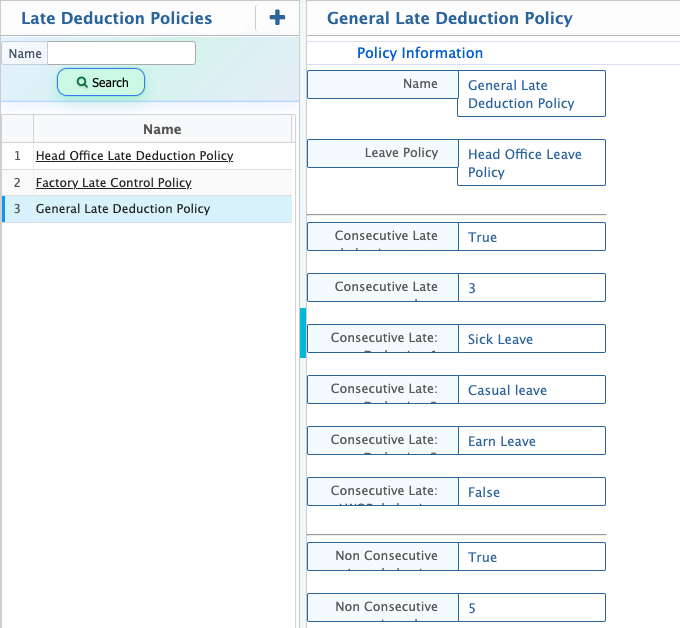
After adding a Late Deduction Policy, it appears in the list with all configured details in a structured view. From this list, the policy can be edited whenever updates are required. Once configured, the policy is applied across the system and employee leave balances are adjusted based on the defined late deduction rules.