Shift Management
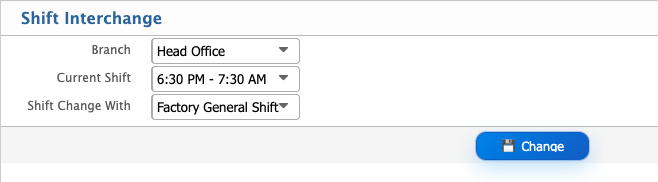
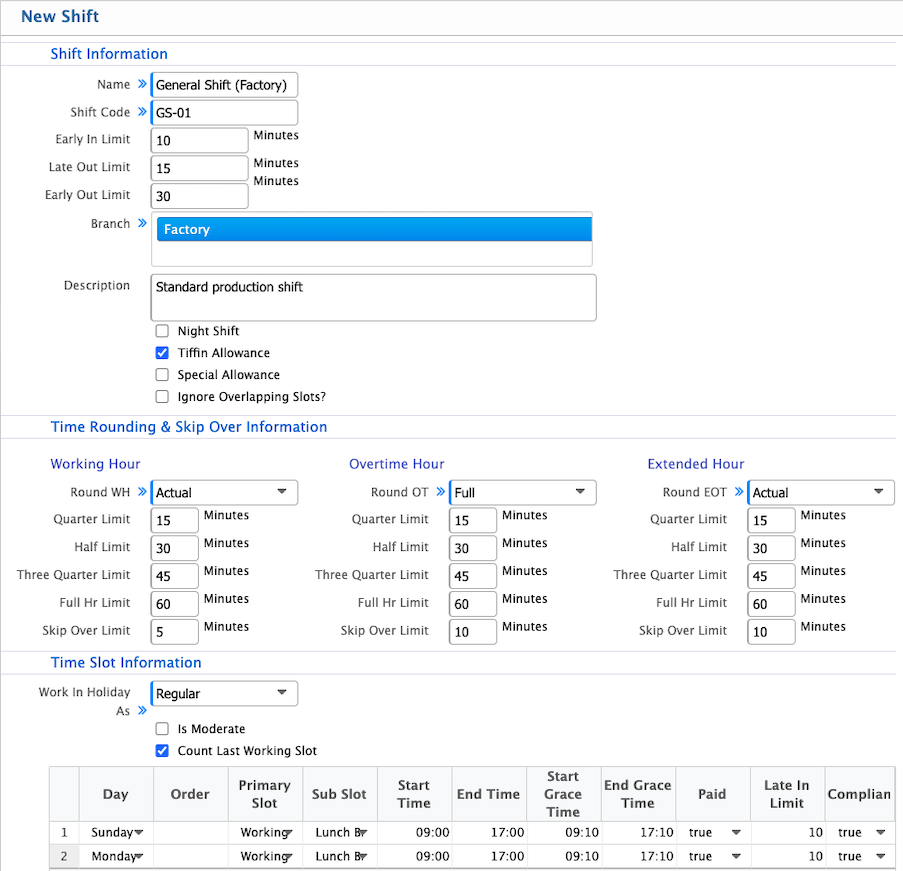
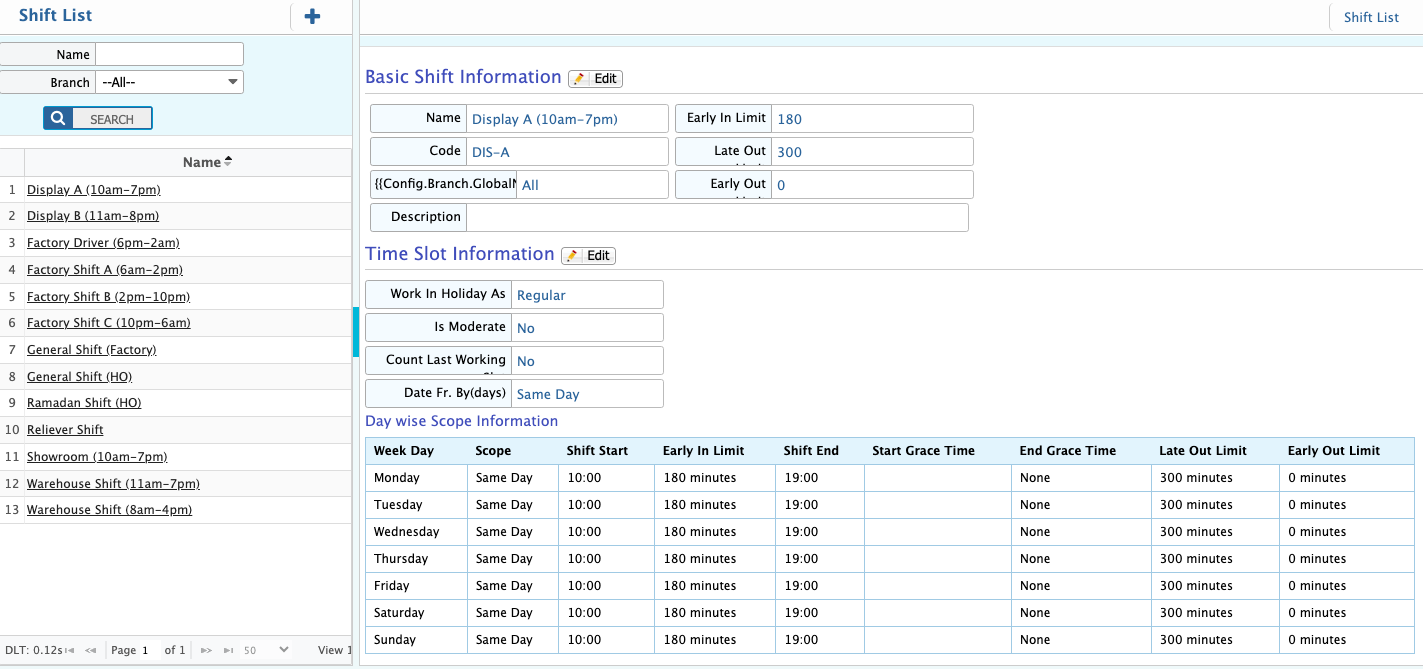
Shift management in PrismERP is used to set up employee working schedules in a structured way. It includes basic details like shift name, code, branch, and description, along with limits for early in, late out, and early out. Users can also enable options such as night shift, allowances, and overlapping slot control depending on requirements. Time rounding rules define how working hours, overtime, and extended hours are calculated using quarter, half, and full-hour limits. Each shift is built with time slots that include start and end times, grace periods, and conditions like paid status and compliance checks. After saving, all shifts are shown in the Shift List where they can be reviewed and updated whenever needed. The Shift Interchange option allows changing an employee’s shift by selecting the current and new shift. This helps adjust employee schedules when required.
Add New Shift
| Field | Action |
|---|---|
| Name | Enter the shift name for identification. |
| Shift Code | Enter a unique code for the shift. |
| Early In Limit (Minutes) | Set allowed early arrival limit in minutes. |
| Late Out Limit (Minutes) | Set allowed late departure limit in minutes. |
| Early Out Limit (Minutes) | Set allowed early exit limit in minutes. |
| Branch | Select the branches where this shift will be applied. |
| Description | Add a short description for the shift. |
| Night Shift | Enable or disable night shift option. |
| Tiffin Allowance | Enable if tiffin allowance is applicable. |
| Special Allowance | Enable if special allowance is applicable. |
| Ignore Overlapping Slots | Enable to ignore overlapping time slots in shift calculation. |
Time Rounding & Skip Over Information
| Field | Action |
|---|---|
| Working Hour Round Type | Select how working hours should be calculated (Actual or Rounded). |
| Quarter Limit (WH) | Set minutes threshold for quarter-hour rounding. |
| Half Limit (WH) | Set minutes threshold for half-hour rounding. |
| Three Quarter Limit (WH) | Set minutes threshold for three-quarter rounding. |
| Full Hour Limit (WH) | Set minutes threshold for full-hour rounding. |
| Skip Over Limit (WH) | Set limit to bypass working hour rounding rules. |
| Overtime Round Type | Select how overtime should be calculated (Actual or Rounded). |
| Quarter Limit (OT) | Set minutes threshold for quarter-hour overtime rounding. |
| Half Limit (OT) | Set minutes threshold for half-hour overtime rounding. |
| Three Quarter Limit (OT) | Set minutes threshold for three-quarter overtime rounding. |
| Full Hour Limit (OT) | Set minutes threshold for full-hour overtime rounding. |
| Skip Over Limit (OT) | Set limit to bypass overtime rounding rules. |
| Extended Hour Round Type | Select rounding method for extended hours (Actual or Rounded). |
| Quarter Limit (EOT) | Set minutes threshold for extended quarter-hour rounding. |
| Half Limit (EOT) | Set minutes threshold for extended half-hour rounding. |
| Three Quarter Limit (EOT) | Set minutes threshold for extended three-quarter rounding. |
| Full Hour Limit (EOT) | Set minutes threshold for extended full-hour rounding. |
| Skip Over Limit (EOT) | Set limit to skip extended hour rounding rules. |
| Work In Holiday As | Define whether holiday work is treated as regular or special. |
| Is Moderate | Enable moderate calculation rules for the slot. |
| Count Last Working Slot | Include last working slot in calculation if enabled. |
| Day | Define applicable day for the slot. |
| Order | Set execution order of time slots. |
| Primary Slot | Mark the slot as primary working slot. |
| Sub Slot | Define secondary working slot if applicable. |
| Start Time | Set slot start time. |
| End Time | Set slot end time. |
| Start Grace Time | Set allowed grace period at start. |
| End Grace Time | Set allowed grace period at end. |
| Paid | Mark whether the slot is paid or not. |
| Late In Limit | Set late arrival threshold for the slot. |
| Compliance | Enable compliance rule checking for the slot. |
After adding a shift, users can view it in the Shift List where all configured shift records are displayed in a structured format. From this list, users can easily edit shift details at any time, including basic information, time slot settings, and time rounding and skip-over rules.
Shift Interchange
| Field | Action |
|---|---|
| Branch | Select the branch where the shift interchange will be applied. |
| Current Shift | Select the employee’s existing shift that needs to be changed. |
| Shift Change With | Select the new shift to replace the current shift (e.g. Night Shift). |
| Shift Interchange | Apply the shift change for the selected configuration. |