Leave Type
In PrismERP, the Leave Type configuration is a backend setup where different types of leave are defined along with the rules that control how they function in the system. It allows creation of leave categories such as Annual Leave, Sick Leave, or Casual Leave and defines how each type is calculated, applied, and restricted.This setup includes rules for leave calculation methods, eligibility conditions, inclusion of holidays and weekends, and validity of unused leave. It also controls operational rules such as application limits, documentation requirements, and allowed leave durations. Additional configurations support advanced policies such as carry forward, encashment, salary impact, and special leave cases like maternity and paternity leave. Overall, this ensures that every leave type in PrismERP follows a consistent and controlled policy structure across the organization.
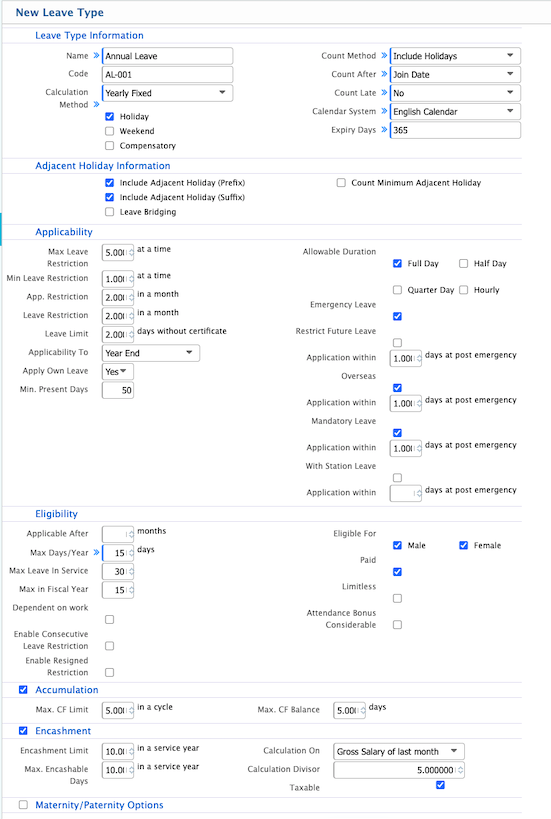
Add Leave Type
| Field | Action |
|---|---|
| Name | Enter a clear and descriptive name for the leave type for easy identification across HR and attendance modules. |
| Code | Enter a unique short code for system-level identification and integration in leave calculations. |
| Calculation Method | Select the method used to calculate leave entitlement such as Yearly Fixed or Count Method. |
| Holiday / Weekend | Define whether weekends and holidays are included or excluded in leave calculation. |
| Compensatory Count Method | Select the method used to calculate compensatory leave based on overtime or attendance rules. |
| Include Holidays | Enable to include public holidays in total leave duration. |
| Count After Join Date | Enable to start leave eligibility after employee joining date. |
| Count Late | Define whether late attendance is included in leave calculation rules. |
| Calendar System | Select the calendar system used for leave calculations. |
| Expiry Days | Set number of days after which unused leave expires. |
| Include Adjacent Holiday (Prefix) | Include holidays before leave start date in calculation. |
| Include Adjacent Holiday (Suffix) | Include holidays after leave end date in calculation. |
| Leave Bridging | Enable continuous leave counting across adjacent holidays. |
| Count Minimum Adjacent Holiday | Set minimum adjacent holidays required for leave bridging. |
| Max Leave Restriction at a time | Set maximum leave allowed per application. |
| Min Leave Restriction at a time | Set minimum leave required per application. |
| Application Restriction in a month | Limit number of leave applications per month. |
| Leave Restriction in a month | Limit total leave days allowed per month. |
| Leave Limit (days without certificate) | Set maximum leave allowed without supporting documents. |
| Applicability To | Define leave applicability scope (service/year-based rules). |
| Apply Own Leave | Allow employees to apply leave independently. |
| Min. Present Days | Set minimum working days required for eligibility. |
| Full Day | Enable full-day leave option. |
| Half Day | Enable half-day leave option. |
| Quarter Day | Enable quarter-day leave option. |
| Hourly Emergency Leave | Enable hourly emergency leave option. |
| Restrict Future Leave | Restrict future-dated leave applications. |
| Application Within | Define allowed submission time after leave request. |
| At Post Emergency | Define rules for post-emergency leave submission. |
| Overseas Application Within | Set rules for overseas leave applications. |
| Mandatory Leave Application Within | Set mandatory submission deadline for leave requests. |
| With Station Leave Application Within | Define station-based leave application rules. |
| Applicable After Months | Set minimum service period before eligibility. |
| Max Days/Year | Define maximum leave allowed per year. |
| Max Leave in Service | Define total leave allowed across service period. |
| Max in Fiscal Year | Set maximum leave per fiscal year. |
| Dependent on Work | Enable eligibility based on work performance. |
| Enable Consecutive Leave Restriction | Restrict consecutive leave usage. |
| Enable Resigned Restriction | Restrict leave after resignation or notice period. |
| Eligible For | Define eligible employee categories. |
| Paid / Limitless | Define whether leave is paid or unlimited. |
| Attendance Bonus Considerable | Define impact on attendance bonus. |
| Deduction On Working Days | Define whether leave affects working day deduction. |
| Deduction Percentage | Set deduction percentage for leave. |
| Max CF Limit in a Cycle | Set carry-forward limit per cycle. |
| Max CF Balance Days | Set maximum carry-forward balance. |
| Encashment Limit in Service Year | Define yearly encashment limit. |
| Max Encashable Days in Service Year | Set maximum encashable leave days. |
| Calculation On | Select salary base for encashment calculation. |
| Calculation Divisor | Define divisor for calculation formula. |
| Taxable | Define whether encashment is taxable. |
| Eligible Upto Lived Children | Set eligibility based on number of children. |
| Max Instances in Service | Set maximum maternity/paternity instances. |
| Max Instances with Pay in Service | Set paid instances limit. |
| Allow Before Birth Days | Set allowed pre-birth leave days. |
| Allow After Birth Days | Set allowed post-birth leave days. |
| Include Delivery Date | Include delivery date in calculation. |
| Medical Certificate | Enable to require medical certificate. |
| Birth Confirmation | Enable to equire birth documentation. |
| Bill Calculation Method | Define salary calculation method. |
| Bill Calculation On | Select salary basis for calculation. |
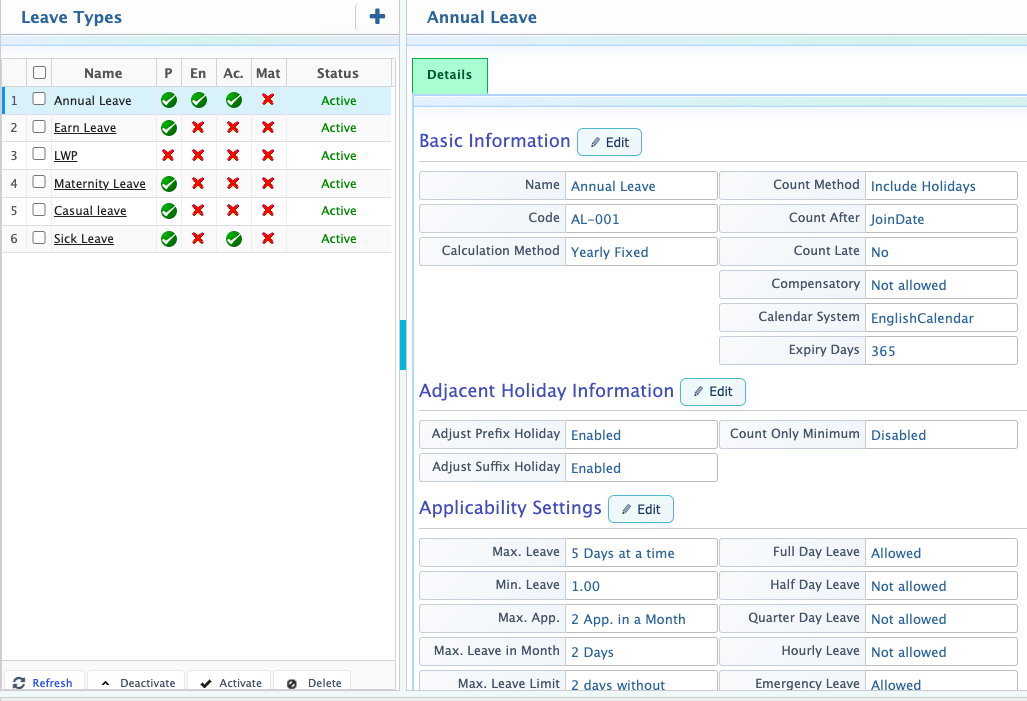
After adding a leave type in PrismERP, all configured rules are displayed in a single view for easy review. From this screen, configurations such as applicability, eligibility, accumulation, and encashment settings can be edited or updated without navigating through multiple modules.Leave types can also be activated or deactivated based on organizational requirements, and removed completely if no longer needed.