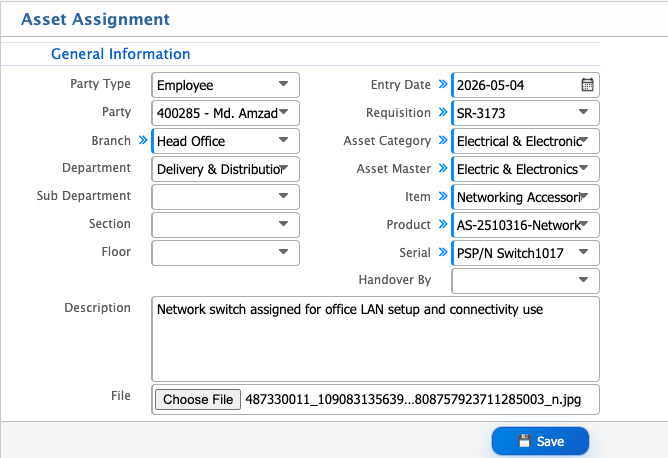
Asset Assignment
In PrismERP, Asset Assignment is used to assign registered assets to employees, departments, or organizational units within the system. It records all assignment details including party information, organizational hierarchy, asset category, item, product, serial number, and handover information.
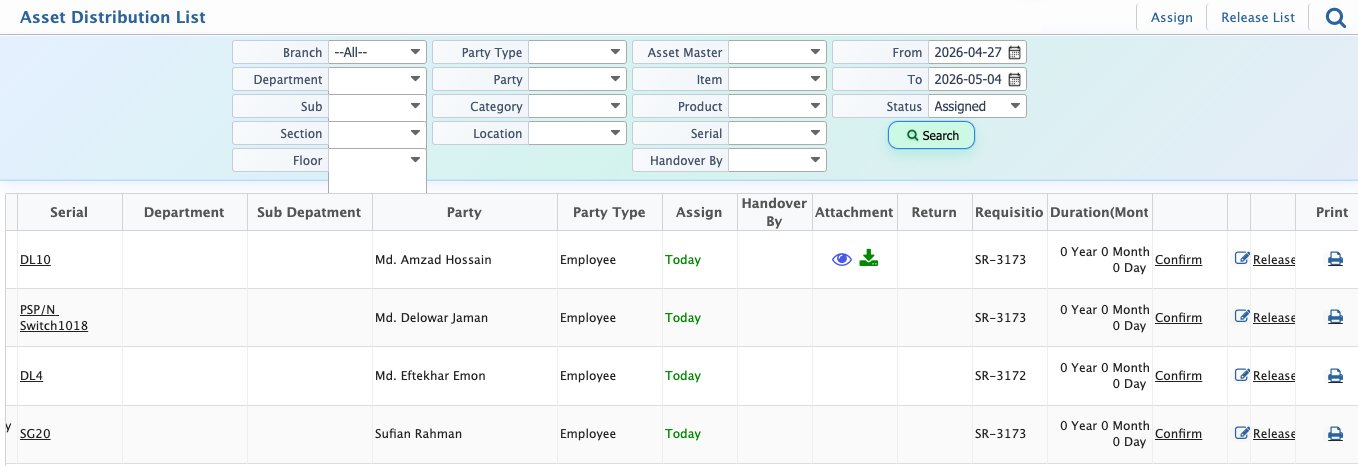
After creating an asset assignment, the record is stored in the system and displayed in the Asset Distribution List, where all assigned assets are maintained. From this list, users can search and filter records based on different criteria such as employee, department, product, or serial number. Users can also confirm the handover to finalize the assignment or release the asset when it is no longer required or needs reassignment.
Add Asset Assignment
| Field | Action |
|---|---|
| Party Type | Select the type of party receiving the asset, such as employee, department, or organizational unit. |
| Party | Select the specific employee, department, or entity that will receive the asset. |
| Branch | Select the branch where the asset assignment is being made. |
| Department | Select the department where the asset will be used or assigned. |
| Sub Department | Select the sub department for more detailed organizational mapping, if applicable. |
| Section | Select the section within the department for asset allocation. |
| Floor | Select the floor location where the asset will be used or placed. |
| Entry Date | Select the date on which the asset assignment is recorded in the system. |
| Requisition | Select the related asset requisition reference for the assignment. |
| Asset Category | Select the category of the asset being assigned. |
| Asset Master | Select the asset master under which the asset is registered. |
| Item | Select the specific asset item being assigned. |
| Product | Select the asset product representing the assignable unit. |
| Serial | Select or enter the serial number of the asset for identification. |
| Handover By | Select the person responsible for handing over the asset. |
| Description | Enter additional details regarding the assignment purpose or usage. |
| File | Upload supporting documents such as approval notes or handover forms. |
After adding an Asset Assignment, users can view all assigned assets in the Asset Distribution List where records are maintained with their current status. Users can search and filter assets based on different parameters to quickly locate specific records. The list also allows users to confirm the handover to finalize the assignment or release the asset when it is no longer in use, making it available for reassignment or return to inventory.