Asset Setup
The Asset Setup section in PrismERP is used to configure and organize the complete fixed asset structure before any asset is purchased, registered, or assigned in the system. It defines how assets are classified, accounted for, tracked, and managed throughout their lifecycle.This setup starts from creating the Asset Account, which acts as the financial base for all fixed assets. From there, Asset Categories are defined to group similar types of assets, followed by Asset Masters, which represent the core asset definitions linked with accounting and depreciation rules. These masters are further broken down into Asset Items, which provide more specific classification under each master. Finally, Asset Products are created to represent the actual purchasable or trackable asset units with detailed product-level information such as SKU, serial structure, and measurement.
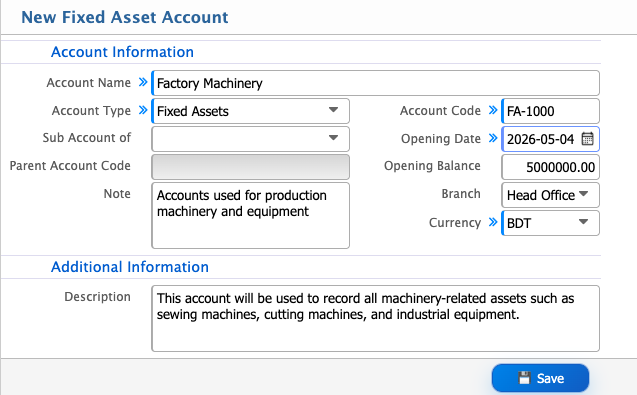
Add Asset Account
| Field | Action |
|---|---|
| Account Name | Enter a unique account name for identifying the fixed asset account in the system |
| Sub Account of | Select the parent account under which this account will be grouped |
| Parent Account Code | Enter or select the corresponding parent account code |
| Note | Enter any internal note related to the account setup |
| Account Code | Enter a unique account code for tracking and reference |
| Opening Date | Select the opening date of the account. |
| Opening Balance | Enter the initial balance for the account |
| Branch | Select the applicable branch or choose all for all branches |
| Currency | Select the currency (default: BDT) |
| Description | Enter a detailed description of the fixed asset account for internal reference |
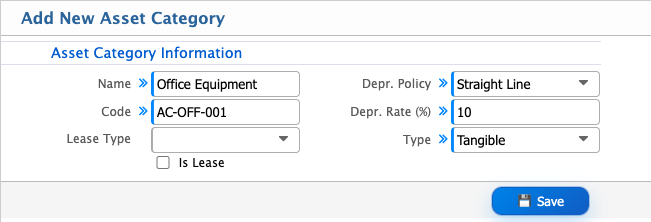
Add Asset Category
| Field | Action |
|---|---|
| Name | Enter a unique name for the asset category (e.g., Office Equipment, Furniture, Vehicles) |
| Code | Enter a unique code to identify the asset category within PrismERP |
| Lease Type | If the asset category is leased select the lease type. |
| Is Lease | Enable this option if the asset category includes leased assets |
| Depr. Policy | Select the depreciation policy applicable for the asset category |
| Straight Line | Select this depreciation method if assets are depreciated evenly over useful life |
| Depr. Rate (%) | Enter the depreciation rate percentage applicable for the asset category |
| Type | Select the asset type classification to group the category under a specific asset structure |
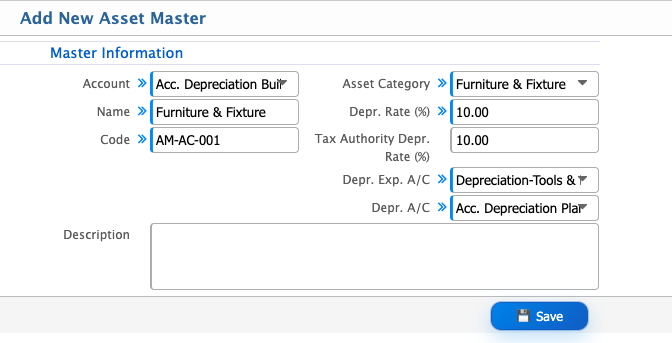
Add Asset Master
| Field | Action |
|---|---|
| Account | Select the fixed asset account under which this asset will be recorded |
| Acc. Depreciation | Select the accumulated depreciation account |
| Name | Enter a unique name for the asset master |
| Code | Enter a unique asset code for identification and tracking |
| Asset Category | Select the asset category |
| Depr. Rate (%) | Enter the depreciation rate applicable for this asset |
| Tax Authority Depr. Rate (%) | Enter the depreciation rate as defined by tax authority rules, if applicable |
| Depr. Exp. A/C | Select the depreciation expense account |
| Depr. A/C | Select the accumulated depreciation account used for recording depreciation value |
| Description | Enter a detailed description of the asset, including usage, location, or specifications |
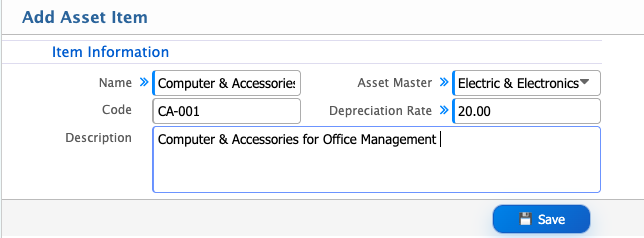
Add Asset Item
| Field | Action |
|---|---|
| Name | Enter a unique name for the asset item |
| Code | Enter a unique code to identify the asset item |
| Asset Master | Select the related asset master under which this item will be grouped |
| Depreciation Rate | Enter the depreciation rate applicable for this asset item |
| Description | Enter a detailed description of the asset item, including its usage and purpose |
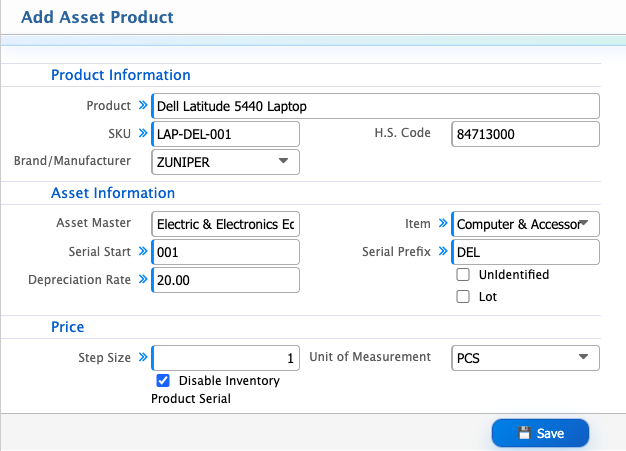
Add Asset Product
| Field | Action |
|---|---|
| Product | Enter the product name for identification. |
| Product SKU | Enter a unique SKU for identifying the asset product |
| H.S. Code | Enter the Harmonized System code for classification purposes |
| Brand/Manufacturer | Select the brand or manufacturer of the asset product |
| Item | Select the corresponding asset item linked to the product |
| Serial Start | Enter the starting serial number for batch or unit tracking |
| Serial Prefix | Enter a prefix used for generating serial numbers |
| UnIdentified | Enable if the product serials are not individually tracked |
| Lot | Enter the lot or batch identifier for grouped tracking |
| Price Step Size | Enter the incremental price step size for valuation or costing adjustments |
| Unit of Measurement | Select the unit of measurement for the asset product |