Asset Batch
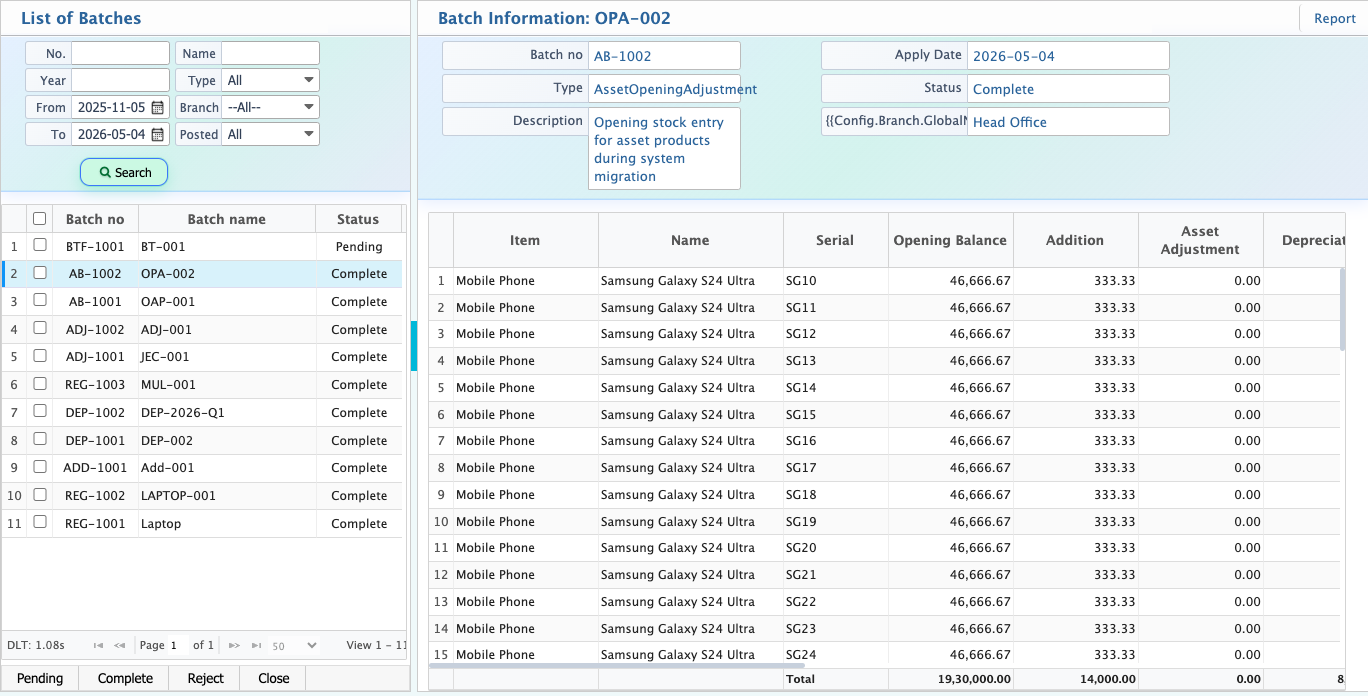
Asset Batch in PrismERP is a central list that contains all types of asset-related batches, including registration batches, addition batches, adjustment batches, sale batches, transfer batches, and opening batches. It provides a unified view for managing and tracking all asset batch activities in one place.
From the Asset Batch list, search functionality allows filtering and locating specific batches based on batch type, date, branch, or reference details. Batch status can also be updated according to workflow requirements, and reports can be generated for documentation and review purposes.
At a glance, each batch provides a detailed summary view including batch number, type, description, apply date, status, and branch. It also includes item-wise asset details such as asset name, serial, opening balance, addition, asset adjustment, depreciation, disposal, closing balance, tax authority values, revaluation amount, and quantity.