Leave Encashment Configuration
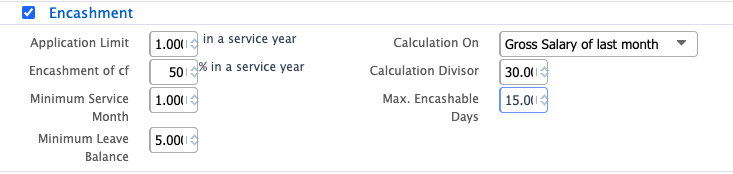
Leave Encashment Configuration in PrismERP Leave Policy defines how unused eligible leave can be converted into monetary value. It controls eligibility conditions, application limits, and calculation rules based on salary structure and service requirements.In this section, users define how unused or eligible leave can be converted into monetary value through encashment rules. The system allows controlling how many encashment applications an employee can submit within a service year, along with the percentage of carry-forward leave that is eligible for encashment.
Users can also set minimum eligibility conditions such as required service months and minimum leave balance before encashment is allowed. The calculation settings determine how the encashment amount is computed, typically based on the employee’s salary (e.g., last month’s basic salary) and a divisor used to calculate per-day value. Finally, users can define the maximum number of leave days that can be encashed within the policy limits.
| Field | Action |
|---|---|
| Application Limit (Service Year) | Define the maximum number of encashment applications an employee can submit within a single service year. |
| Encashment of CF (%) | Set the percentage of carry-forward leave that is eligible for encashment in a service year. |
| Minimum Service Month | Define the minimum number of service months required before an employee becomes eligible for encashment. |
| Minimum Leave Balance | Set the minimum leave balance an employee must retain before applying for encashment. |
| Calculation On | Select the salary base used for encashment calculation, such as Basic Salary of last month. |
| Calculation Divisor | Define the divisor used to calculate per-day encashment value from salary. |
| Max. Encashable Days | Set the maximum number of leave days that can be encashed under this policy. |